
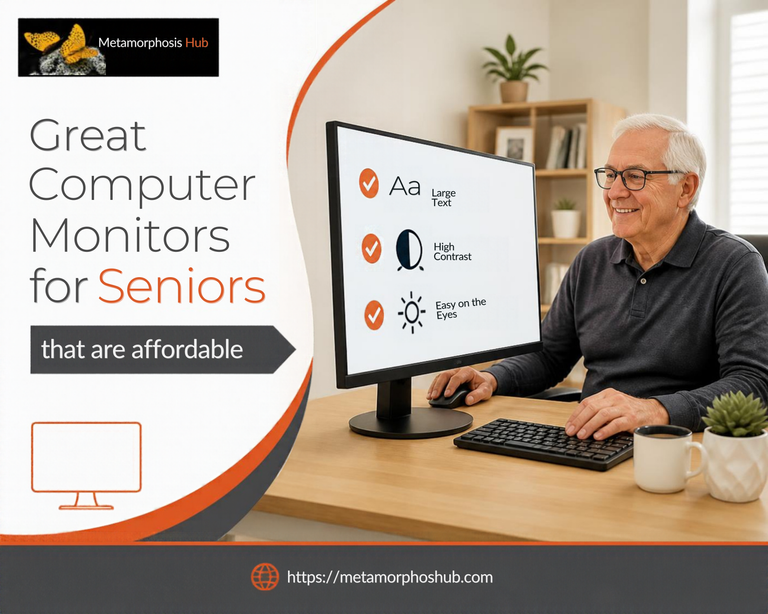
Compare 5 great computer monitors for seniors with clear 24-inch screens, eye-care features, easy setup, speakers, and ergonomic options. Many cutting-edge monitors designed for the gaming industry have superior technology and are also available for everyday use.
Fortunately, aging adults can tap into this dynamic industry and acquire a great computer monitor that suits their needs if they understand those criteria that are better suited for seniors.
A cutting-edge monitor is non-negotiable for those seeking a superior computer setup. Whatever purpose you are going to use it for, the right display can have a significant and transformative impact on your computing experience – and on your eyes!
This article will assist you to make an informed decision from an overwhelming number of options of computer monitors on Amazon. We evaluate five great computer monitors for seniors we found that match criteria to look for when buying a monitor for an aging adult.
Because of the fast pace of technology, this article has been updated to reflect newer models on Amazon.ca.
Features to Check When Buying a Computer Monitor for Seniors
| Criteria | What to Look For |
|---|---|
| Display size and resolution | Look for a monitor with a larger display size for easier visibility, such as 24 inches or larger. A higher resolution (1080p or higher) will also provide clearer images and text. |
| Adjustable stand | Make sure the monitor has an adjustable stand that allows the screen to be easily positioned at a comfortable viewing angle for the senior user. |
| Easy-to-use controls | Consider monitors with simple, user-friendly controls for adjusting settings like brightness and contrast. |
| Anti-glare coating: | A monitor with an anti-glare coating can help reduce reflections and eye strain, which is important for seniors who may be more sensitive to bright lights. |
| Connectivity options | Check for a monitor that offers multiple connectivity options, such as HDMI, VGA, and USB ports, to easily connect other devices. |
| Blue light filter | Some monitors come with a blue light filter feature that reduces harmful blue light emissions, which can help reduce eye strain and improve sleep quality. |
| Warranty and support | Look for a monitor with a good warranty and reliable customer support in case any issues arise with the device. |
| Budget | Consider the budget when choosing a monitor, as there are options available at different price points that still offer quality features for senior users. |
| Check Online Reviews | Check product rating and read online reviews of other users |
Best Computer Monitors for Seniors Compared
Over 70 computer monitors were reviewed with the criteria for seniors. We also took into account consumer reviews and comments.
| Monitor | Strongest senior-relevant features | Main limitation | Best For |
|---|---|---|---|
| SANSUI 24″ 180Hz | FHD, very smooth 180Hz motion, 300-nit brightness, high contrast, eye-care features, HDMI + DP | Tilt-only stand, no speakers; gaming specs exceed what most seniors need | Smooth Scrolling & Casual Gaming |
| Dell S2425HSM | IPS, 300 nits, TÜV 4-Star Eye Comfort, anti-glare, dual speakers, height + tilt + swivel + pivot, 2 HDMI | Likely costs more than the simpler choices; no DisplayPort | Overall Computer Monitor for Seniors |
| BenQ GW2491 | IPS, Low Blue Light Plus, Flicker-Free, ePaper mode, Eye-CareU compatibility, TÜV/Eyesafe certifications, HDMI + DP | 250 nits, tilt-only stand, no built-in speakers | Eye Comfort & Reading |
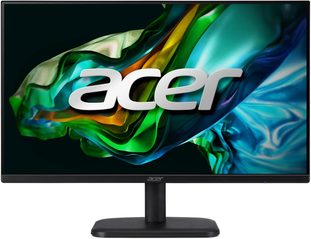
| Acer EK241Y Gbi | IPS, FHD, 120Hz, 1ms, FreeSync, HDMI + VGA, lightweight, simple | 250 nits, tilt-only, no speakers, fewer modern ports | Low-Cost Monitor for Seniors |
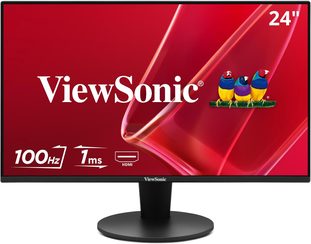
| ViewSonic VS2447M | FHD, anti-glare, eye-care, HDMI + VGA, FreeSync, built-in speakers, legacy-PC compatibility | Tilt-only stand; specifications vary by regional/version listing | Older Computers & Simple Multimedia Use |
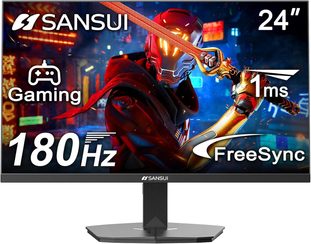
SANSUI 24-Inch 180Hz FHD Computer Monitor – Best for Smooth Scrolling and Casual Gaming
Specifications
- Screen size: 24 inches
- Resolution: Full HD, 1920 × 1080
- Refresh rate: Up to 180Hz
- Response time: 1ms MPRT
- Brightness: 300 nits
- Contrast ratio: 4000:1
- Colour coverage: 110% sRGB
- HDR: Supported
- Adaptive Sync: FreeSync / Adaptive Sync
- Connections: HDMI and DisplayPort
- Included cable: HDMI cable
- Viewing angle: Up to 178° horizontal/vertical
- Stand adjustment: Tilt approximately -5° to +15°
- VESA mounting: 75 × 75 mm
- Eye-comfort features: Low-blue-light/eye-care and flicker-reduction features
- Built-in speakers: No
Product Description
The SANSUI 24-inch ES-G24F4 is unusual among the monitors in this guide because it combines everyday Full HD computing with a very high 180Hz refresh rate.
Seniors do not need 180Hz for email or everyday browsing, but it can make scrolling webpages, moving windows, and video appear noticeably smoother than on an older 60Hz monitor.
At 1920 × 1080 resolution, text and icons can also be enlarged easily through Windows display scaling if the default size feels too small.
Its 300-nit brightness, strong stated contrast, and eye-care features are more relevant for everyday senior use. HDMI and DisplayPort also provide good compatibility with newer computers.
Another practical advantage is the included HDMI cable. That sounds minor, but for a senior or caregiver setting up a new monitor, having the required cable in the box makes installation easier.
The main compromises are ergonomics and audio. The stand offers tilt adjustment rather than height adjustment, and there are no built-in speakers. Seniors who need better screen positioning or integrated audio may prefer the Dell or ViewSonic.
Pros and cons
| PROS | CONS |
| – Very smooth 180Hz display -300-nit brightness and strong contrast -Eye-care features -HDMI and DisplayPort & HDMI cable is included -VESA mountable -Good option for seniors who also enjoy gaming -Large Amazon.ca review base | -No built-in speakers -Stand is tilt-only with no height adjustment -180Hz and 1ms gaming performance are unnecessary for ordinary email, browsing, or document use |
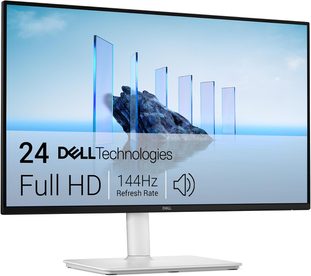
Dell 24 Plus Monitor S2425HSM – Best Overall Computer Monitor for Seniors
Specifications
- Series: BENQ GW2480
- Screen size: 23.8 inches
- Resolution: Full HD, 1920 × 1080
- Panel: IPS
- Refresh rate: Up to 144Hz
- Response time: 1ms MPRT; 4ms GTG in Extreme mode
- Brightness: 300 nits
- Contrast ratio: 1500:1
- Colour coverage: 99% sRGB
- Viewing angles: 178° horizontal and vertical
- Eye-comfort features: TÜV Rheinland 4-Star Eye Comfort, flicker-free, low blue light, anti-glare
- Adaptive Sync: AMD FreeSync
- Speakers: Dual built-in 3W speakers
- Connections: 2 HDMI 1.4 ports
- Stand adjustment: Height, tilt, swivel and pivot
- Height adjustment: Up to 110 mm
- VESA mounting: 100 × 100 mm
- Included cable: HDMI cable
- Colour: Ash White
Product Description
The Dell 24 Plus S2425HSM earns our Best Overall Computer Monitor for Seniors position because several of its features directly address everyday usability for seniors.
Its biggest advantage is the height, tilt, swivel, and pivot adjustable stand. Being able to position the screen at a comfortable eye level.
That flexibility can be especially useful for seniors who find themselves leaning forward, looking downward, or sitting awkwardly to see a fixed-height screen. Being able to bring the monitor to a more comfortable eye level may make long periods of reading, email, banking, video calls, or browsing easier.
The 23.8-inch Full HD IPS panel also provides wide 178-degree viewing angles. This means the picture remains relatively consistent when viewed slightly from the side—useful if a caregiver or family member is sitting beside the senior and looking at the same screen.
The IPS display provides 300-nit brightness and wide viewing angles, while TÜV 4-Star Eye Comfort, anti-glare treatment, flicker-free operation, and reduced blue-light features support more comfortable viewing.
Another major advantage is the pair of built-in 3W speakers, eliminating the need for separate desktop speakers for video calls, news, and general entertainment. The main limitation is connectivity: there are two HDMI ports but no DisplayPort, USB-C, or VGA.
The 144Hz refresh rate is still useful, even for someone who never plays games. Scrolling through webpages and moving windows can appear smoother than on an older 60Hz monitor. However, most seniors do not need 144Hz specifically, so treat it as a welcome extra rather than the main reason to choose this model.
Pros and cons
| PROS | CONS |
| -Fully adjustable height, tilt, swivel and pivot stand -300-nit brightness -TÜV 4-Star Eye Comfort features -Built-in dual 3W speakers -Wide viewing angles -Smooth 144Hz refresh rate -Two HDMI inputs -HDMI cable included. | – No DisplayPort, USB-C or VGA connection; -Costs more than the basic models -144Hz and 1ms performance exceed what most seniors need for ordinary computing; |
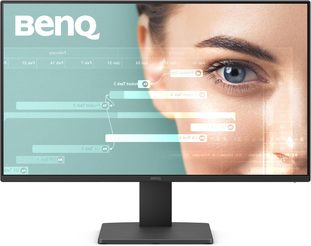
BenQ GW2491 23.8-Inch Eye-Care Monitor for Seniors – Best for Reading
Specifications
- Screen size: 23.8 inches
- Resolution: Full HD, 1920 × 1080
- Panel: IPS
- Refresh rate: 100Hz
- Response time: 5ms
- Brightness: 250 nits
- Contrast ratio: 1300:1
- Colour coverage: 99% sRGB
- Viewing angles: 178° horizontal and verticalScreen coating: Anti-glare
- Eye-care features: Low Blue Light Plus, Flicker-Free, ePaper Mode
- Eye-care certification: TÜV/Eyesafe certification
- Software: Compatible with BenQ Eye-CareU
- Connections: 1 HDMI 1.4, 1 DisplayPort 1.2
- Headphone jack: Yes
- Built-in speakers: No
- Stand adjustment: Tilt only, approximately -5° to +20°
- VESA mounting: 100 × 100 mm
- Included cable: HDMI cable
Product Description
The BenQ GW2491 is our Best for Eye Comfort and Reading choice suited for seniors because its strongest features are aimed at people who spend significant time reading webpages, email, documents, news, or other text-heavy content.
The Full HD IPS display provides wide 178-degree viewing angles and 99% sRGB colour coverage. For seniors, the IPS panel can be useful when the monitor is not viewed perfectly straight-on or when a caregiver or family member is sitting beside them looking at the same screen.
Its strongest feature is BenQ’s eye-care package, including Low Blue Light Plus, Flicker-Free technology, anti-glare treatment, and ePaper Mode. ePaper Mode creates a simplified black-and-white presentation that can make text-heavy content more comfortable to read.
The 100Hz IPS display also provides smooth scrolling and wide viewing angles, while HDMI and DisplayPort give it useful modern connectivity.
Its main weaknesses are the 250-nit brightness, tilt-only stand, and lack of built-in speakers.
At 250 nits, the BenQ is not as bright as the 300-nit Dell and SANSUI models in this comparison. That should be adequate for normal indoor use, but seniors using a monitor in a particularly bright room may prefer a brighter display.
The headphone jack is useful, but because there are no built-in speakers, anyone wanting audio for video calls, YouTube, or entertainment will need headphones or external speakers.
Seniors whose priority is ergonomic adjustment may be better served by the Dell.
Pros and cons
| PROS | CONS |
| -Strong emphasis on eye-comfort features -ePaper Mode for reading -Low Blue Light Plus technology & Flicker-Free -Anti-glare IPS screen display -Smooth 100Hz refresh rate -HDMI and DisplayPort; HDMI cable included | -250-nit brightness is lower than the Dell and SANSUI -No built-in speakers -Stand offers tilt adjustment only -No height, swivel, or pivot adjustment -No USB-C connection |
Acer EK241Y Gbi 24-Inch Monitor – One of the Best Affordable Computer Monitors for Seniors
Specifications
- Screen size: 23.8 inches
- Resolution: Full HD, 1920 × 1080
- Panel: IPS
- Refresh rate: Up to 120Hz
- Response time: 1ms VRB
- Brightness: 250 nits
- Viewing angles: 178° horizontal and vertical
- Colour coverage: 99% sRGB
- Screen surface: Anti-glare
- Adaptive Sync: AMD FreeSync
- Eye-comfort features: Flicker-Free, BlueLight filter, Acer VisionCare
- Connections: 1 HDMI and 1 VGA
- Stand adjustment: Tilt only
- VESA mounting: 100 × 100 mm
- Included cable: HDMI cable
- Built-in speakers: No
Product Description
The Acer EK241Y Gbi is our Best Low-Cost Monitor for Seniors who want an affordable computer monitor for seniors without paying for premium features they may not use.
Its Full HD IPS display provides wide 178-degree viewing angles while the 120Hz refresh rate makes scrolling and general on-screen movement smoother than on an older 60Hz monitor.
At 250 nits, it is not as bright as the 300-nit Dell or SANSUI. That should still be adequate for typical indoor use, but the difference may matter in a particularly bright room.
For longer computer sessions, the Acer includes Flicker-Free technology, a BlueLight filter, anti-glare, and Acer VisionCare features. These are more relevant to seniors than the 1ms gaming response time because they are designed to make extended screen viewing more comfortable. The anti-glare screen can also help reduce distracting reflections from lamps and windows.
The combination of HDMI and VGA is particularly helpful for households with older computers because VGA can connect to some legacy desktops without an adapter.
Cost savings do bring compromises: there are no built-in speakers, and the stand provides tilt adjustment only.
Pros and cons
| PROS | CONS |
| -Affordable Full HD IPS display -Smooth 120Hz refresh rate -Eye-comfort and anti-glare features -HDMI plus VGA for newer and older PCs -HDMI cable included -VESA mountable | – No built-in speakers -Tilt-only stand -250-nit brightness -No DisplayPort or USB-C |
ViewSonic VS2447M 24 Inch Monitor for Seniors – Best for Older Computers and Simple Multimedia Use
Specifications
- Screen size: 24 inches (23.6-inch viewable area)
- Resolution: Full HD, 1920 × 1080
- Panel: MVA
- Refresh rate: 100Hz on the Amazon.ca configuration
- Response time: 4ms
- Brightness: 250 nits
- Static contrast ratio: 3000:1
- Viewing angles: 178° horizontal and vertical
- Screen surface: Anti-glare
- Adaptive Sync: AMD FreeSync
- Eye-comfort features: Flicker-Free technology and Blue Light Filter
- Connections: 1 HDMI and 1 VGA
- Audio connections: Audio-in and headphone/audio-out
- Built-in speakers: Dual 2W speakers
- Stand adjustment: Tilt, approximately -5° to +20°
- VESA mounting: 100 × 100 mm
- Thin-bezel design: Three-sided frameless appearance
- Compatibility: Windows PCs, Macs and other HDMI/VGA devices
Product Description
The ViewSonic VS2447M earns its place in this comparison as our Best for Older Computers and Simple Multimedia Use for seniors who want a simple monitor that works with both newer and older computers.
Its most useful feature for seniors is actually quite straightforward: it combines a modern HDMI connection with a VGA input. HDMI works with most newer computers and laptops, while VGA can be particularly useful for an older desktop that is still functioning well but does not have a modern digital video output.
That can make the ViewSonic a practical replacement monitor for seniors who want a better screen without replacing an entire computer system.
Another important advantage is its built-in dual speakers. Seniors can use video calls, watch online videos, or listen to basic audio without adding separate speakers and more cables to the desk. ViewSonic
Eye-care features include an anti-glare screen, Flicker-Free technology, and a Blue Light Filter. The main compromise is the tilt-only stand, and its 250-nit brightness is lower than the Dell and SANSUI. ViewSonic Documentation
Its 100Hz refresh rate is another welcome improvement over an older 60Hz monitor. Scrolling through webpages, moving windows and general on-screen motion should appear smoother, although—as with the higher-refresh monitors elsewhere in this guide—100Hz should be regarded as a useful extra rather than an essential senior feature.
Pros and cons
| PROS | CONS |
| -HDMI plus VGA connectivity for older desktop computers -Built-in dual 2W speakers -Strong stated contrast -Anti-glare and eye-care features -Smooth 100Hz refresh rate | -Tilt-only stand -250-nit brightness -No DisplayPort or USB-C -Built-in speakers are designed for basic audio |
Final Assessment – Great Computer Monitors for Seniors
Among these five monitors, the Dell 24 Plus S2425HSM is the one I would place first for a typical senior who wants a dependable everyday display rather than the cheapest possible option. Its adjustable stand, eye-comfort features and built-in speakers give it the strongest combination of senior-friendly features without requiring extra accessories.
The BenQ does not beat the Dell as the best all-round monitor, but it has the clearest reading and eye-comfort identity of the five. The combination of ePaper Mode, Low Blue Light Plus, Flicker-Free technology, anti-glare coating, and Eye-CareU gives us a strong, senior-relevant reason to include it rather than treating it as just another inexpensive 24-inch display.
The Acer is the strongest choice in this group for a senior who wants a straightforward, affordable 24-inch monitor for everyday use. It does not have the Dell’s ergonomic stand or BenQ’s more specialized reading features, but it gives seniors the core features that matter most—Full HD clarity, IPS viewing angles, anti-glare treatment, eye-comfort tools, and easy compatibility with both newer and some older computers.
The SANSUI is a strong choice for seniors who value smooth on-screen movement or who also enjoy casual gaming, although Its 180Hz refresh rate is far more than most everyday computer tasks require,
The ViewSonic is not the strongest monitor in the group for ergonomics or specialized eye-care features. Its advantage is practical simplicity. HDMI plus VGA provides unusually useful compatibility, while the built-in speakers eliminate another peripheral from the desk. For a senior replacing an older monitor—or wanting a simple screen for browsing, email, video calls and everyday multimedia—it fills a very clear role that the other four monitors do not.
Related Articles
- 7 Best and Easiest Tablets for Seniors: Compared
- Eye Health in Seniors – What to Expect in Aging Adults
- Discover How to Improve Aging Eyesight – 8 Tips
- How Aging Affects Vision – Best Foods for Aging Eyes
- 9 Natural Remedies for Eyesight – Improve Vision
- How to Improve Eyesight with Exercises – 7 Tips
FAQs About Computer Monitors for Seniors
Which are the best monitors for seniors?
The Dell S2425HSM is our best overall computer monitor for seniors because it combines an adjustable stand, built-in speakers, eye-comfort features, good brightness, and a clear IPS display. Seniors prioritizing reading comfort may prefer the BenQ GW2491.Factors you should check when buying a low cost.
Is a 24-inch monitor big enough for seniors?
Yes. A 24-inch monitor is large enough for many seniors, especially at Full HD resolution with text and display scaling increased when needed. Seniors with more significant vision difficulties may prefer a larger screen or higher Windows text-scaling settings.
What monitor features are best for seniors?
Useful monitor features for seniors include an anti-glare screen, eye-comfort technology, good brightness and contrast, adjustable positioning, built-in speakers, wide viewing angles, and easy-to-use connections. Larger text can also be enabled through the computer’s display settings.
Are eye-care monitors better for seniors?
Eye-care monitors may be more comfortable for seniors who spend long periods reading or browsing. Features such as flicker-free technology, low-blue-light settings, anti-glare screens, and reading modes can improve viewing comfort, although they do not treat age-related vision problems.
References
ViewSonic Documentation. https://manuals.viewsonic.com/VS2447M
ViewSonic Product Specification Sheet. https://www.viewsonic.com/global/products/sheet/VS2447M-2T