
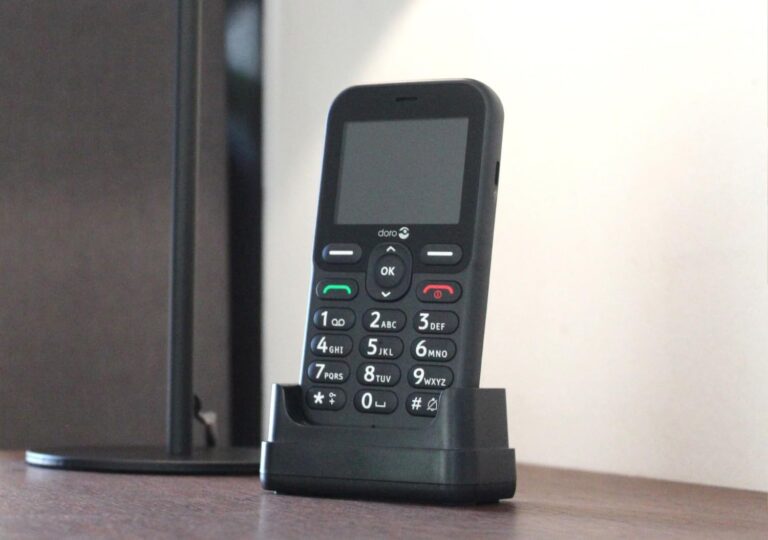
Compare the best cell phones for seniors, including hearing-aid-friendly, easier-to-use options for comfort, clarity, and everyday safety.
Finding the best cell phones for seniors is harder than it should be. On the surface, there seem to be lots of options. But once you start checking current listings, ratings, and real-world usability, the field gets thinner fast.
That is exactly what happened here. Some older senior-phone brands that once looked promising now have weak ratings, disappearing listings, or both.
That is why this updated guide focuses on phones that are easier to recommend right now: two Samsung smartphones and three Doro senior-focused phones.
The goal is not to chase the longest product list. It is to compare a smaller group of options that better fit current senior needs for hearing support, comfort, and everyday usability.
This guide is especially useful for older adults and caregivers trying to answer questions like:
- what phones are good for seniors?
- what is the best cell phone to buy for seniors?
- which phones work better for hearing aid users?
- which phones are easier for seniors with arthritis or dexterity issues?
Why Choosing the Best Cell Phones for Seniors Is Harder Than It Looks
The best senior phone is not always the newest or most expensive one. It is the one that matches the person using it.
Some seniors want a simple flip phone with large buttons and clearer sound. Others want a smartphone for photos, maps, texting, video calls, or health apps. Some need better hearing support. Others care more about grip, weight, menu simplicity, or charging convenience.
All seniors do not need the same kind of phone. A phone that works well for hearing loss may not be the best choice for arthritis. A simple feature phone may be ideal for one older adult and far too limited for another.
That is why this comparison focuses on real senior-use priorities rather than just flashy specs.
Some older adults may still prefer a home-phone setup, so these Panasonic cordless phones for seniors may be worth comparing too.
What Makes the Best Cell Phones for Seniors Different?
The best cell phones for seniors usually do a few things better than standard models.
Easy-to-read screens and simple menus
Seniors often do better with:
- clearer screens
- higher contrast
- simpler home screens
- larger text
- easier navigation
That is one reason Doro phones stand out. Their product descriptions emphasize widely separated keys, external displays on flip models, and ClearSound-style hearing support. Doro’s Leva L30 manual also describes the external display, high-contrast keys, and easier use design.
Louder sound and better call clarity
For seniors, louder is not always enough. Better speech clarity matters too. Hearing-aid-compatible phones are judged partly by how well they reduce interference and how they work with telecoils through their M and T ratings.
Comfort for seniors with arthritis or dexterity issues
Seniors with arthritis may find it easier to use:
- bigger physical buttons
- flip phones that are easier to grip
- phones with docks or simple charging
- lighter models that are easier to hold
Battery life, charging, and everyday practicality
A phone can have strong specs and still be a poor fit if it is hard to charge, too slippery, too heavy, or too confusing.
That is why this guide includes both smartphones and simpler Doro phones. Seniors have very different comfort levels.
Seniors who care more about large buttons than smartphone apps may also want to compare big button phones for seniors before deciding.
How to Choose a Cell Phone for Seniors With Hearing Loss, Arthritis, or Simpler Needs
Best features for seniors with hearing loss
Look for:
- hearing aid compatibility
- clearer call sound
- louder speaker volume
- Bluetooth support for hearing devices
- strong call clarity settings
Samsung provides hearing-aid and Bluetooth hearing-device support guidance across Galaxy devices, and Doro explicitly markets hearing-aid-compatible modes and ClearSound features on its senior phones.
Best features for seniors with arthritis
Look for:
- larger buttons
- easier grip
- easier charging
- simple opening and closing for flip phones
- uncluttered menus
Best features for seniors who want a simpler phone
Many seniors do not want dozens of apps or endless notifications. In that case, a Doro flip phone or simple bar-style phone may be a better fit than a full smartphone when considering best cell phones for seniors.
What Hearing Aid Compatibility Means in a Senior Cell Phone
Hearing-aid-compatible phones are often labeled with M and T ratings.
The M rating relates to interference reduction, while the T rating relates to telecoil compatibility. Higher ratings generally mean better hearing-aid compatibility.
That matters because some phones may sound loud enough but still create frustrating interference or poor clarity when paired with hearing aids.
Doro’s official Leva E30 product page explicitly states M4/T4 hearing-aid compatibility for 4G bands, and both the Leva E30 and Leva L30 manuals state hearing-aid compatibility.
Samsung also documents hearing-aid support and Bluetooth hearing-aid features on Galaxy devices.
If clearer calls are still not enough on their own, these top rated hearing amplifiers may also be worth looking at.
A Few Cell Phone Terms Seniors and Caregivers Should Know
When comparing the best cell phones for seniors, a few common tech terms show up again and again. They can sound more complicated than they really are, so here is a simple guide.
Unlocked vs. Locked Phones
An unlocked phone can usually be used with different compatible carriers, which gives seniors more flexibility if they want to change providers later. A locked phone is tied to one carrier or a limited set of carriers.
For many seniors and caregivers, an unlocked phone is the easier long-term option because it gives more freedom and can make switching plans less stressful.
3G, 4G, and 5G
These terms refer to different generations of mobile network technology. 3G is older and much less useful today. 4G is still common and works well for calling, texting, browsing, and video. 5G is newer and can offer faster performance where coverage is available.
For most seniors buying a phone now, choosing a 4G or 5G phone makes far more sense than buying anything tied to older 3G-era technology.
What Gigabytes (GB) Mean
Gigabytes, often written as GB, usually refer to storage space. That is the room a phone has for:
- photos
- apps
- videos
- messages
- downloaded files
A phone with more GB gives seniors more space before they need to delete things. For light users, a modest amount of storage may be enough. For seniors who take lots of photos or use more apps, extra storage is helpful.
What RAM Means
RAM affects how smoothly a phone handles tasks. In simple terms, more RAM usually means the phone can switch between apps more easily and feel less sluggish.
Most seniors do not need to obsess over RAM, but it is still useful to know that it plays a role in how responsive a phone feels during everyday use.
For seniors who feel nervous about newer devices, technology for seniors boosts confidence can help make the learning curve feel less intimidating
Quick Comparison Table: Best Cell Phones for Seniors
The table below gives a quick side-by-side view of the best cell phones for seniors based on ease of use, hearing support, comfort, and everyday practicality.
| Phone | Best For | Phone Type | Hearing Support | Ease of Use | Main Strength | Main Watch-Out |
|---|---|---|---|---|---|---|
| Samsung Galaxy A15 5G | Best overall | Smartphone | Strong Galaxy accessibility ecosystem | Moderate | Best value mix of modern features and usability | Still more complex than a basic senior phone |
| Samsung Galaxy S21 FE 5G | Best premium smartphone | Smartphone | Strong Galaxy accessibility ecosystem | Moderate | Better performance and display | More than some seniors need |
| Doro Leva E30 | Best flip phone for hearing support | Flip phone | Strong, explicit HAC support | Easy | Senior-friendly design with clearer hearing support | Less flexible than a smartphone |
| Doro Leva L30 | Best senior flip phone with external display | Flip phone | Hearing aid compatible | Easy | External display and simple calling | More limited apps and features |
| Doro Leva E10 | Best basic phone for simplicity | Basic phone | Doro senior-focused sound support | Very easy | Straightforward calling and buttons | Least flexible overall |
SAMSUNG GALAXY A15 5G: Best Overall Smartphone for Seniors
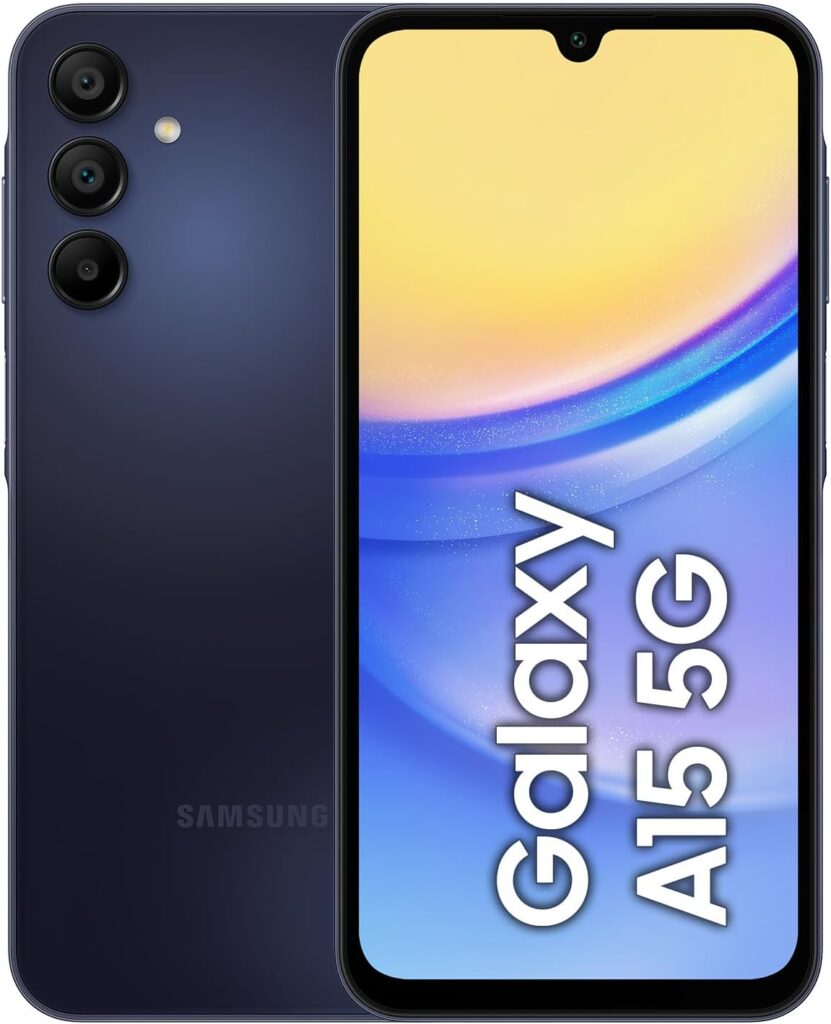
The SAMSUNG GALAXY A15 5G is the best overall pick here because it gives seniors a modern smartphone without jumping straight into expensive flagship pricing. This model has top ratings and reviews on Amazon.ca.
Why it stands out
It is the strongest all-around balance of:
- current Android smartphone features
- reliable brand support
- better long-term confidence than many niche “senior phones”
- access to apps, video calling, and everyday smartphone functions
Best features for seniors
- 6.5-inch screen on surfaced listings
- Samsung accessibility ecosystem
- hearing-aid and Bluetooth support guidance across Galaxy devices
- better app access than simpler senior phones
- mainstream familiarity for family support and troubleshooting
Possible drawbacks
It is still a smartphone, which means:
- more settings
- more notifications
- a touchscreen learning curve
- less simplicity than a Doro flip phone
Best for
Seniors who want one phone for calling, texting, photos, apps, and daily life, but still want something reasonably approachable.
SAMSUNG GALAXY S21 FE 5G: Best Premium Smartphone for Seniors
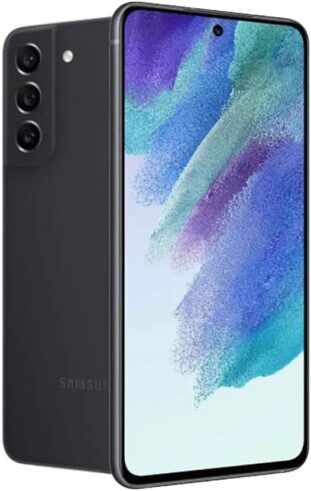
The SAMSUNG GALAXY S21 FE 5G is the stronger premium-style option in this list. It is well rated and has over 560 reviews on Amazon.ca.
Why it stands out
It offers a more polished smartphone experience than the A15, with a stronger screen and more premium overall feel.
Best features for seniors
- Samsung accessibility ecosystem
- solid screen quality
- stronger premium smartphone experience
- familiar Android environment for caregivers and family members already using Samsung devices
Possible drawbacks
- higher price than the A15
- may be more phone than many seniors need
- still more complex than a true senior-focused phone
Best for
Seniors who are comfortable with smartphones and want a better overall device rather than the simplest possible phone.
DORO LEVA E30: Best Cell Phones for Seniors With Hearing Loss
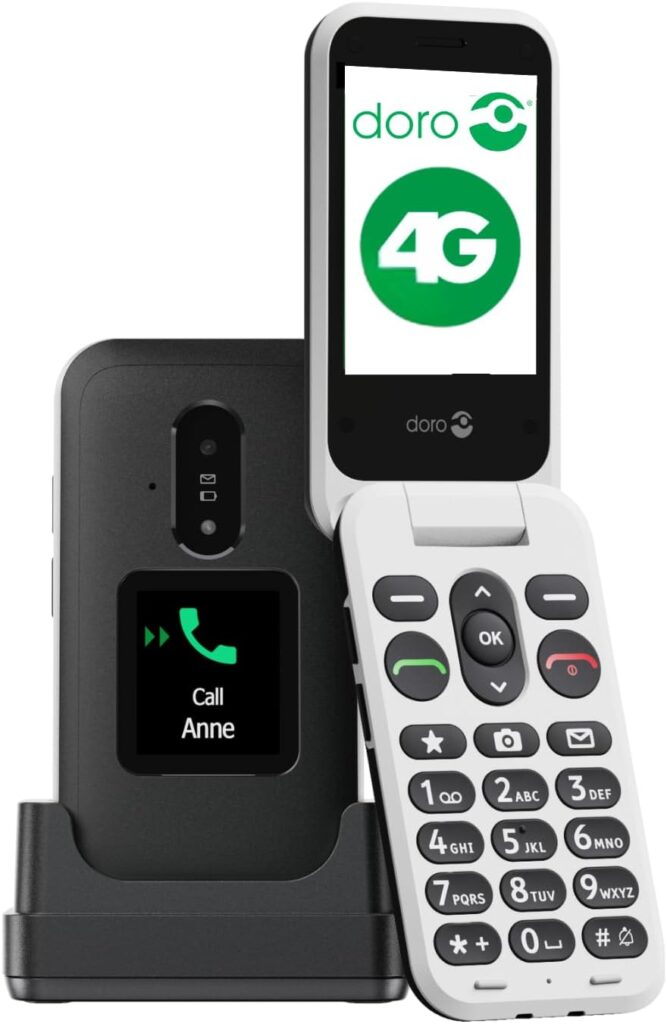
The DORO LEVA E30 is the strongest dedicated senior flip phone in this lineup. It has more than 250 reviews on Amazon.ca and is well rated. DORO’s official product page explicitly lists M4/T4 hearing-aid compatibility.
Why it stands out
This is the clearest senior-first hearing-support option in the group.
Best features for seniors
- flip phone design
- external display
- high-contrast buttons
- clear sound positioning
- explicit hearing-aid compatibility
- charging cradle/dock style convenience shown in listings
Possible drawbacks
- less flexible than a smartphone
- fewer apps and advanced features
- more focused on calling simplicity than broader smartphone use
Best for
Seniors who want a simpler phone and stronger hearing support without the complexity of a smartphone.
DORO LEVA L30: Best Senior Flip Phone With External Display
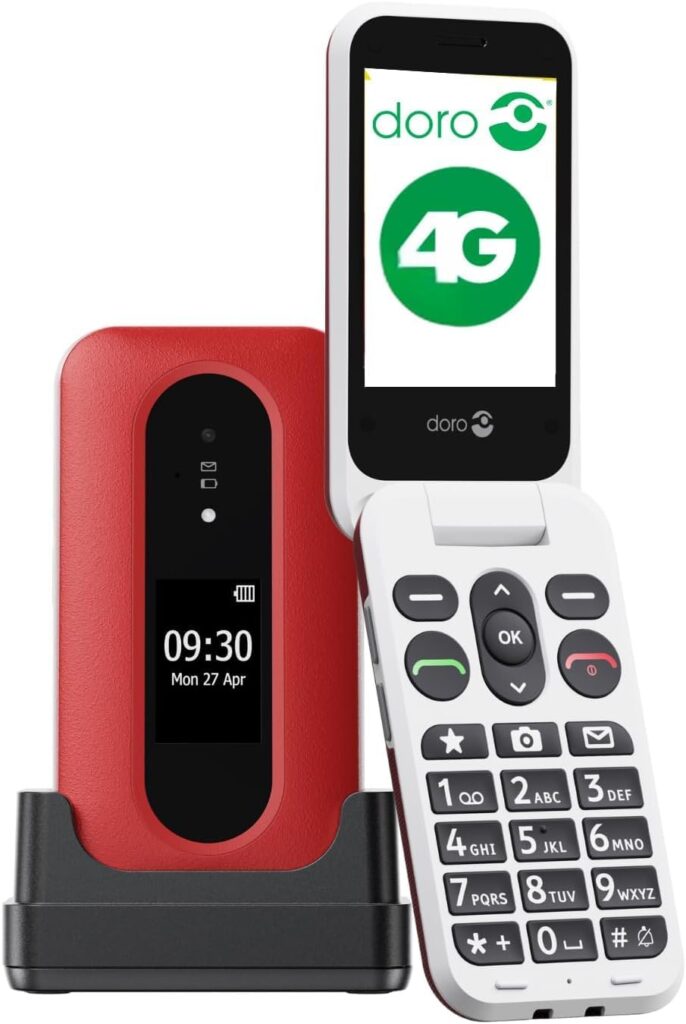
The DORO LEVA L30 is another strong DORO flip option. Its official manual says it is hearing-aid compatible and highlights the external display, 2.8-inch main screen, and high-contrast keys.
Why it stands out
It fits seniors who want the reassurance of an outer display while keeping a simple flip-phone layout.
Best features for seniors
- external display for caller ID and notifications
- high-contrast buttons
- no contract
- easier calling and texting design
- hearing-aid compatibility noted in official documentation
Possible drawbacks
- less flexible than a smartphone
- fewer advanced features
- may not be ideal for seniors who want apps, maps, or more digital tools
Best for
Seniors who want a straightforward flip phone that is easier to read and easier to manage.
DORO LEVA E10: Best Basic Phone for Seniors Who Want Simplicity
The DORO LEVA E10 is the simplest option in this DORO lineup. Amazon search results position it as a DORO senior phone with a 2.4-inch landscape display, high-contrast buttons, and clear-sound design.
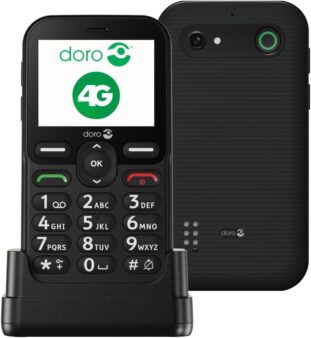
DORO’s support materials also list it within the Leva device family.
Why it stands out
It is the least intimidating option for seniors who do not want a smartphone or even a more feature-rich flip phone.
Best features for seniors
- straightforward calling
- physical buttons
- simple senior-phone design
- high-contrast visual approach
- easier learning curve than smartphones
Possible drawbacks
- the least flexible option
- smaller 2.4 inch main screen
- limited app and internet use
- not for seniors who want advanced smartphone features
Best for
Older adults who mainly want a reliable phone for calling and basic everyday communication.
Which are the Best Hearing Aid Compatible Cell Phones for Seniors?
If hearing support is the top priority, the strongest choices here are:
- DORO LEVA E30
- DORO LEVA L30
- Samsung Galaxy A15 5G
- Samsung Galaxy S21 FE 5G
The DORO phones are easier to recommend when simplicity matters most because they are built around senior-friendly calling, hearing support, and clearer physical controls.
SAMSUNG is stronger when the senior also wants smartphone features, app access, and a more mainstream ecosystem.
DORO explicitly documents hearing-aid compatibility on the Leva line, while SAMSUNG documents hearing-aid and Bluetooth hearing-device support on Galaxy phones.
Some of the best cell phones for seniors with hearing loss are not the simplest phones overall, so hearing support should be weighed against usability.
Which Cell Phone Is Best for Seniors With Arthritis or Dexterity Challenges?
For seniors with arthritis, the easier choices are usually the Doro phones because:
- they have physical buttons
- they are simpler to navigate
- they are less dependent on touchscreen accuracy
For seniors who can still comfortably use a touchscreen, the Samsung Galaxy A15 may be the better balance between usability and modern features.
In practical terms:
- choose Doro for simpler physical controls
- choose Samsung for broader smartphone flexibility
The best cell phones for seniors with arthritis are usually the ones that are easier to grip, easier to press, and less frustrating to handle.
Phones come with technical terms, endless plan options, and features that sound impressive but may not actually matter in daily use. That is why it helps to slow down and start with the basics.
Seniors and caregivers looking for a simple pre-buying guide to choose the right phone before comparing specific models should refer to:
Best Cell Phones For Senior Citizens: How to Choose the Right One
Conclusion: How to Choose the Right Phone for Senior Needs
When families ask what phones are good for seniors, the answer usually depends on hearing, hand comfort, and how simple the phone needs to be.
If you are still wondering what is the best cell phone to buy for seniors, start by deciding whether simplicity or smartphone flexibility matters more.
The best cell phones for seniors are not all built for the same person. Some seniors need hearing support first. Some need bigger buttons and simpler menus. Others want a full smartphone that family members can easily help them set up and use.
That is why this rebuilt guide works better than the older scattered product pages. Instead of trying to compare weak or disappearing phone listings, it focuses on 5 stronger current options that better match real senior priorities.
For most seniors, the best quick summary is this:
- choose Samsung Galaxy A15 5G for the best overall modern value
- choose Samsung Galaxy S21 FE 5G for a stronger premium smartphone
- choose Doro Leva E30 or Doro Leva L30 for simpler flip-phone use with hearing support
- choose Doro Leva E10 if simplicity matters most
A simple phone can also make a very practical choice among the best gifts for seniors and grandparents when safety and communication matter most.
FAQs for What Phones are Good for Seniors
What is the best cell phone to buy for seniors?
For many seniors, the best balance is a phone that is easy to hear, easy to hold, and easy to use. In this list, the Samsung Galaxy A15 5G is the strongest overall pick, while Doro phones are better for simplicity.
What cell phones are good for seniors with hearing loss?
Phones with hearing-aid compatibility, clearer sound, and stronger call support are the best fit. The Doro Leva E30 and Leva L30 stand out here, and Samsung Galaxy devices also support hearing-aid-related features.
Are Doro phones good for seniors?
Yes. Doro phones are specifically designed for older adults, with features like high-contrast buttons, simpler layouts, and hearing-support features.
What are the best cell phones for seniors with arthritis?
Phones with clearer physical buttons and easier handling are often better for seniors with arthritis, which makes simpler Doro models easier choices than many smartphones.
Do seniors need a flip phone or a smartphone?
It depends on the person. Seniors who want apps, maps, and video calls may do better with a smartphone. Seniors who mainly want easy calling and simpler controls may do better with a flip phone.
Related Articles
References
Lynch, David 2021 What Is A GB? The Real Definition Of A Gigabyte! https://www.upphone.com/learn/glossary/cellular/what-is-a-gb-real-definition-of-gigabyte/
Hildenbrand, Jerry 2022. How much RAM does your Android phone actually need in 2022? https://www.androidcentral.com/ram-what-it-how-its-used-and-why-you-shouldnt-care
















Thank you for this post! I have often wondered what all those letters stood for and now I know! I like how you easily compared the different options of phones to purchase for seniors. Currently I have a Google XL (I think!!) and it is working well. When I am in the market to upgrade to a new one I will definitely consult this blog post to make a decision.
Thanks again for all the tips on purchasing a cell phone.
Nina
Hello Nina,
I am delighted that you found value in this article. I know from personal experience how confusing it can be to select a new phone, and for seniors and the elderly it must be even more overwhelming. I hope people find this article helpful in the way I have presented the information simply for them to understand.
Ceci
A very well written article. I learnt a lot here and now I know what a ram is now which is cool.
Thabo,
Thanks for taking the time to read this article. I am also glad that you have a better understanding of what a RAM is. I hope this article can help you compare cell phones not only for seniors but for anyone.
Ceci
Very well-written and detailed article about cell phones. I also like the explanations of technical terms. I have a Samsung Galaxy, another model. But from this article, I can learn a lot about the details of Samsung phones.
All the best!
Thanks for the read and comment Ana. I am glad that you found value in the article.
Ceci